Your Mac, spotless in one click.
CleanerMac lives in your menu bar and clears the junk, caches, duplicates and forgotten giants that slow your Mac down — safely, privately, and in your own language.
3 days free · then $24.99 once

Everything your Mac needs, in one tidy menu.
Nine focused tools. No bloat, no background hogging, no nag screens.
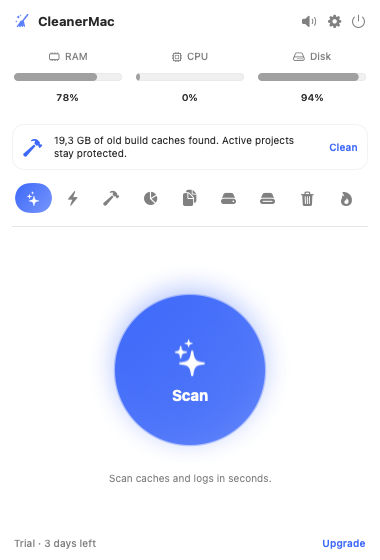
| One-Click Clean | Sweep caches and logs in seconds. Open apps are never touched, so nothing you're working on breaks. |
| Disk X-Ray | See exactly where your space went — drill into any category down to individual files with plain-language advice. |
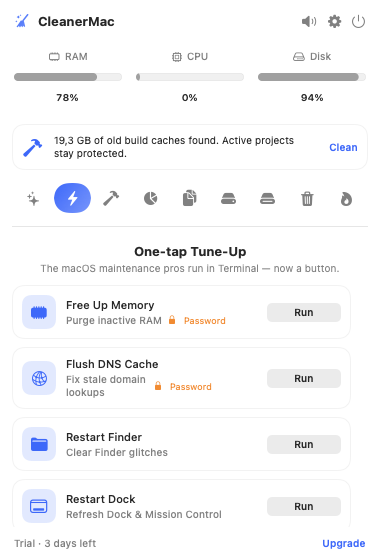
| One-Tap Tune-Up | Free RAM, flush DNS, restart Finder & Dock, reset Quick Look — the Terminal tricks pros use, now buttons. |
| Duplicate Finder | Finds true duplicates by content (SHA-256), not name. Keep one, trash the rest with a single tap. |
| Smart Uninstaller | Removes an app and every hidden leftover — caches, preferences, containers, login items — nothing left behind. |
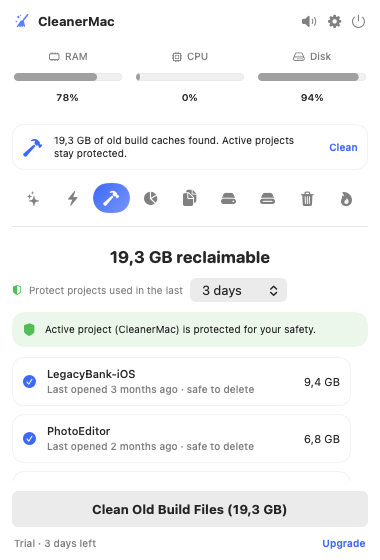
| Developer Deep Clean | Reclaims gigabytes of old Xcode & build caches while protecting the projects you're actively working on. |
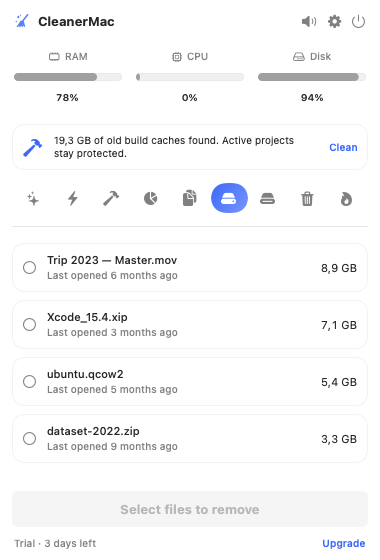
| Large & Old Files | Surfaces files over 500 MB you haven't opened in months, ready to review and remove. |
| Secure Erase | Overwrite and permanently destroy sensitive files in the Trash — beyond recovery. |
| Quiet Scheduler | Runs in the background on your cadence and nudges you with a gentle, native notification — never intrusive. |
Sound familiar?
The everyday Mac annoyances CleanerMac makes disappear.
That dreaded warning, right when you need space the most.
Bloated caches and a full startup disk drag everything down.
Dragging an app to the Trash leaves gigabytes of hidden leftovers.
Gigabytes vanish into caches, duplicates and forgotten downloads.
CleanerMac fixes all of it — in one click.
See it in action
Real screens from the app — not mockups.
Built the right way.
Everything runs on your Mac. No accounts, no tracking, nothing uploaded — ever.
A tiny, fast SwiftUI menu-bar app. No Electron, no background bloat, no battery drain.
No subscriptions. One purchase unlocks everything, forever, with free updates.
Fully localized — because you shouldn't have to guess what a cleanup button does.
How CleanerMac compares
Everything the big names do — without the subscriptions, bloat or scare tactics.
| Feature | CleanerMac | CleanMyMac | MacKeeper |
|---|---|---|---|
| One-time price (no subscription) | ✓ | ✕ | ✕ |
| Lightweight menu-bar app | ✓ | ✕ | ✕ |
| No account required | ✓ | ✕ | ✕ |
| 100% private, nothing uploaded | ✓ | ✓ | ✕ |
| Removes app leftovers completely | ✓ | ✓ | ✕ |
| Developer / Xcode deep clean | ✓ | ✕ | ✕ |
| One-tap RAM & DNS tune-up | ✓ | ✕ | ✕ |
| 20 languages | ✓ | ✕ | ✕ |
Mac users love a tidy Mac
What early users say after their first cleanup.
Reclaimed 43 GB on the first run. It found duplicate photos I'd been backing up for years.
Finally an uninstaller that actually removes everything. My Library folder is clean again.
Lives in my menu bar, speaks my language, and never nags. Exactly what I wanted.
Simple, honest pricing.
Try it free. Unlock everything once — keep it forever.
Free Trial
Everything unlocked, no card
- Every Pro feature
- No account or credit card
- All 20 languages
- No obligation to buy
Pro
One-time · lifetime
- Unlimited cleaning, every day
- Duplicate finder & Smart Uninstaller
- Developer Deep Clean & Secure Erase
- Free updates forever
Frequently asked questions
Is CleanerMac safe?
Very. CleanerMac only ever looks in known-safe locations — app caches and logs, Downloads, Xcode DerivedData — never your macOS System files, which the OS protects anyway. Safety is rule-based: caches and logs are regenerable, so removing them is safe; anything uncertain (large or old files) is labelled "review," never auto-selected. It skips the caches of apps that are open, most removals go to the Trash so they're recoverable, and you review everything before it runs. You can also mark any folder as Protected in Settings — CleanerMac will then never scan or touch it.
Does it work on Apple Silicon?
Yes — CleanerMac is a native universal app for both Apple Silicon (M-series) and Intel Macs, on macOS 13 Ventura or later.
Is it a subscription?
No. CleanerMac is a one-time $24.99 purchase that unlocks everything forever, including future updates. You get a 3-day free trial with every feature unlocked first — no card required.
Is my data private?
Completely. CleanerMac runs entirely on your Mac. There are no accounts, no analytics and nothing is ever uploaded.
Popular Mac guides
Free how-tos for the most-searched Mac problems — and how CleanerMac solves each one.

Ready for a faster, cleaner Mac?
Download CleanerMac and reclaim your disk in the next five minutes.
Download for MacFree to try · macOS 13+ · Apple Silicon & Intel · v1.3.0